GitHub maandumislehe ehitajale: minimaalne miinimum, mida pead teadma
EE
Paljud alustajad kardavad GitHubi, sest see tundub keerulise tarmvaraarendajate tööriistana. Kuid maandumislehe ülespanekuks ei pea sa teadma midagi versioonihaldusest, harudest ega terminali käskudest.
Siin on absoluutne miinimum, mida sa tegelikult vajad.
1. Mis on GitHub?
Mõtle GitHubist kui Google Drive’ist, aga spetsiaalselt veebilehe koodifailide (HTML, CSS, pildid) jaoks. Sa hoiad oma faile seal turvaliselt pilves.
2. Kogu tegevus käib läbi brauseri
Sa ei pea oma arvutisse midagi installima.
- Loo konto (kui sul seda veel pole).
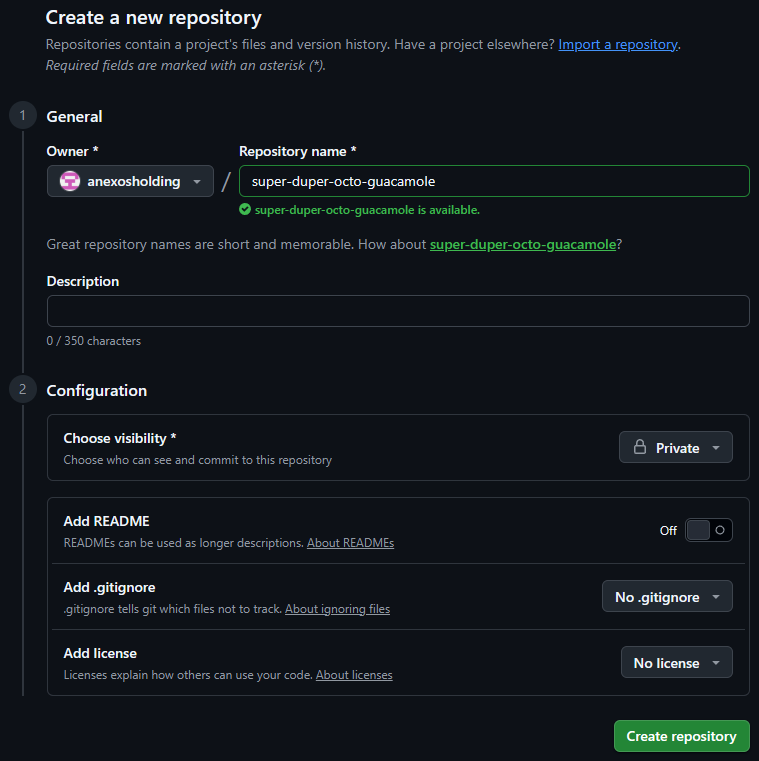
- Klõpsa paremal üleval nurgas ”+” ja vali “New repository” (uus hoidla).
- Anna projektile nimi (näiteks
maandumisleht), vali Public ja klõpsa “Create repository”.
3. Kuidas kood sinna saab?
Kui kasutad tehisintellekti (nagu Google Antigravity), loob see sulle valmis failid. GitHubis olles saad need failid lihtsalt hiirega brauserisse lohistada (“upload an existing file”) või luua faile käsitsi nupust “Add file” -> “Create new file”.
Sul on vaja vaid kahte asja:
index.html(sinu pealeht)package.jsonjadist/kataloog (kui kasutad Astrot või muud tööriista)
4. Kuidas Cloudflare selle üles leiab?
Kui su kood on GitHubis, lähed sa Cloudflare’i:
- Valid Workers & Pages -> Create application -> Pages -> Connect to Git.
- Cloudflare küsib luba sinu GitHubi kontole ligipääsuks ja sa valid oma uue repositooriumi.
- Cloudflare loeb GitHubist failid kokku, ehitab lehe valmis ja teeb selle avalikuks.
Kokkuvõte
GitHub on lihtsalt turvaline kaust pilves, kust Cloudflare käib su lehe sisu lugemas iga kord, kui sa midagi muudad. Sa ei pea õppima programmeerijate trikke — piisab failide üleslaadimisest brauseri kaudu.
ENG
Many beginners are scared of GitHub because it looks like a complex developer tool. But to launch a landing page, you don’t need to know anything about version control, branches, or terminal commands.
Here is the absolute minimum you actually need to know.
1. What is GitHub?
Think of GitHub as Google Drive, but specifically for website code files (HTML, CSS, images). It keeps your project files safe in the cloud.
2. Everything happens in the browser
You don’t need to install anything on your computer.
- Create an account (if you haven’t already).
- Click the ”+” icon in the top right and select “New repository”.
- Name your project (e.g.
landing-page), choose Public, and click “Create repository”.
3. How does the code get there?
If you’re using an AI tool (like Google Antigravity), it generates the files for you. In GitHub, you can simply drag and drop your files into the browser (“upload an existing file”) or create files manually via “Add file” -> “Create new file”.
You only need:
index.html(your main page)- Your build files/folders (if using a framework like Astro)
4. How does Cloudflare find it?
Once your code is in GitHub, you go to Cloudflare:
- Go to Workers & Pages -> Create application -> Pages -> Connect to Git.
- Cloudflare asks permission to access your GitHub account, and you select your repository.
- Cloudflare pulls the files from GitHub, builds the site, and publishes it globally.
Summary
GitHub is just a secure cloud folder where Cloudflare reads your website files every time you make an update. You don’t need to learn advanced developer tricks — uploading files through the browser is enough.